Miran — Digital Assessment Platform

A digital practice and assessment platform for maths and science.

Students practise interactive questions in the style of international maths and science assessments — drag-and-drop, drawing, tables and virtual labs — even offline. Around them sit a teacher desk, an item studio, a leadership dashboard and an operations centre, all on one sign-in.

  • 5 role platforms
  • 25+ item types
  • Arabic · English
  • Works offline
Miran — Digital Assessment Platform
01 / 08

01 · One family, five platforms

Each platform shaped by the people who use it

One shared core — identity, item bank, question runtime, scoring engine, offline sync and analytics — with a purpose-built workspace for every role. Sign in once and the platform takes you to the right place.

Student HubDaily practice, skill paths, tools, instant feedback, offline.
Teacher DeskWhat needs attention, heat-maps, assign remedial practice.
Item StudioAuthor, review, verify and publish; 25+ interaction types.
Insight DashboardNational → region → school drill-down, reports and exports.
Operations CentreBulk import, schools, tickets, platform health, full audit.
02 · For students

Playful, calm and built for a nine-year-old

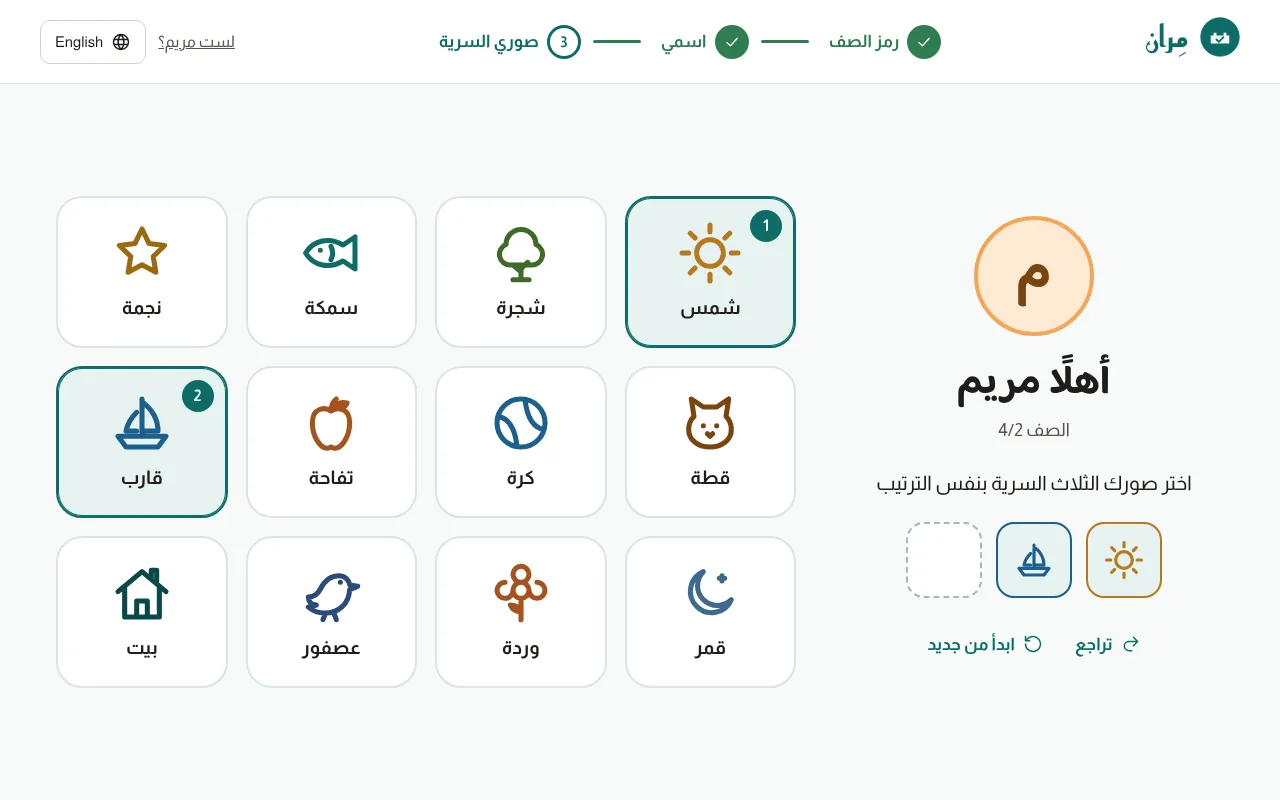
Young students sign in by choosing three secret pictures — no passwords. Questions are fully interactive, with a calculator, ruler and protractor on hand, a hint after each attempt, and progress that keeps working when the school’s internet drops.

  • Drag-and-drop, drawing, tables, virtual labs
  • Skill paths, achievements and “my mistakes”
  • First attempt kept separate from mastery after retries
Picture-password sign-in: the child picks three secret pictures

03 · For teachers

See who needs help — and with what — every morning

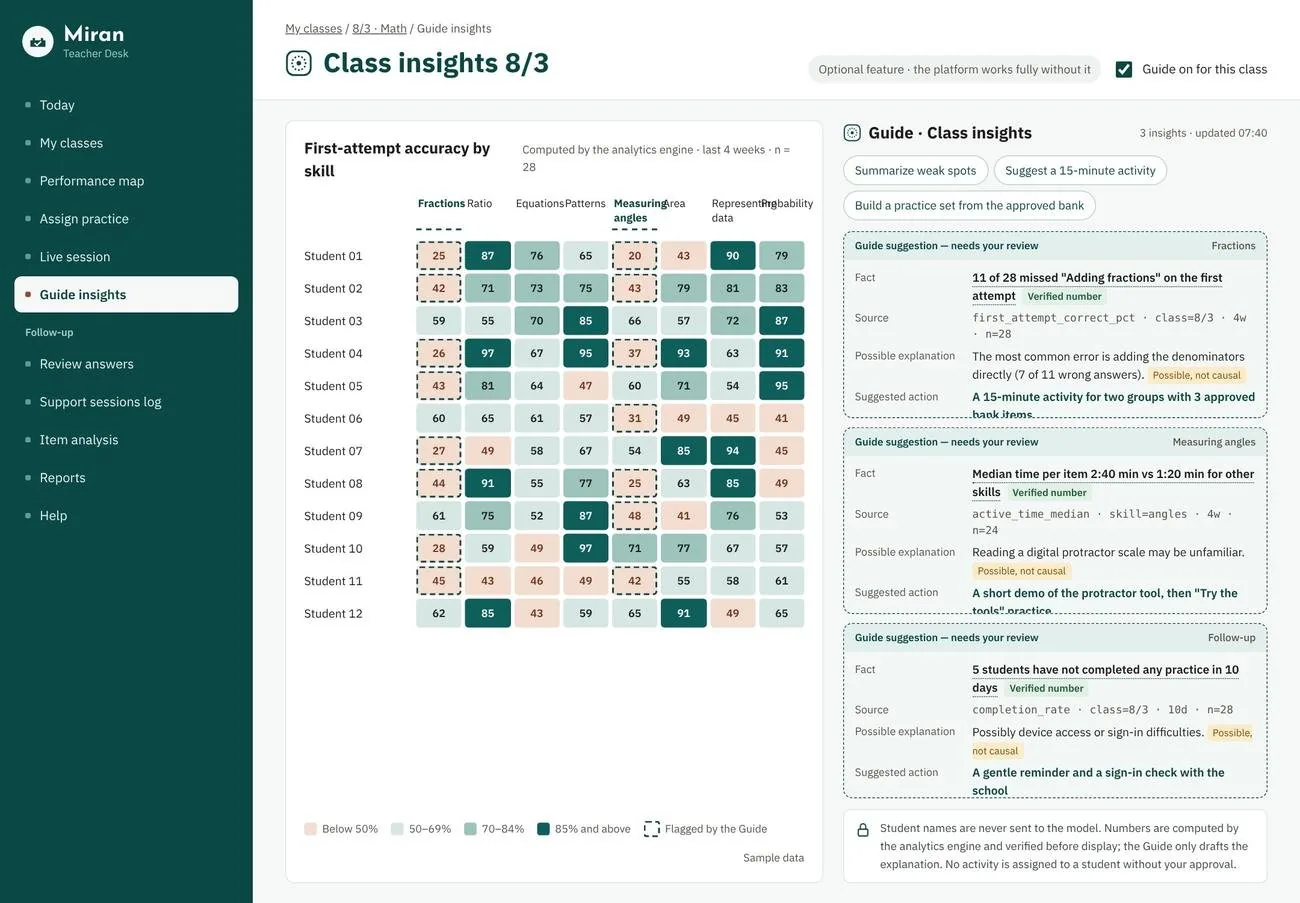
A heat-map of first-attempt accuracy by skill, with an optional guide that explains patterns using verified numbers only, labels every explanation “possible, not causal”, and never assigns work without the teacher’s approval. Student names are never sent to a model.

Teacher desk class insights with a skill heat-map and guide suggestions

04 · For content specialists

An item studio with scientific review built in

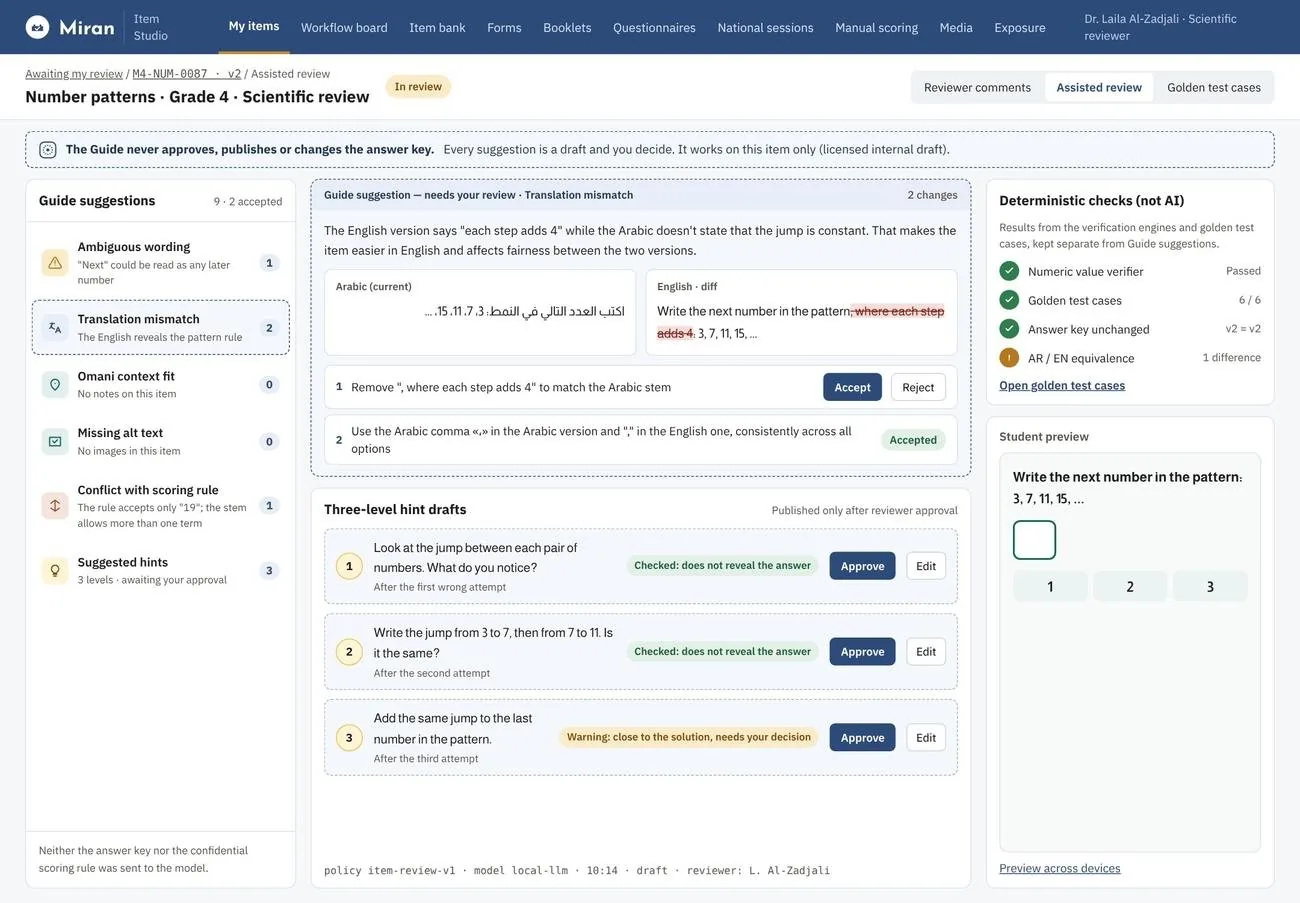
Author → scientific review → translation check → publish, with a two-person rule at each step. Deterministic engines check numeric values, answer keys and golden test cases; the AI guide flags ambiguous wording and Arabic/English mismatches — but never approves, publishes or changes the answer key.

Item studio scientific review with a translation-mismatch suggestion and hint drafts

05 · For leadership

From the national picture to a single classroom

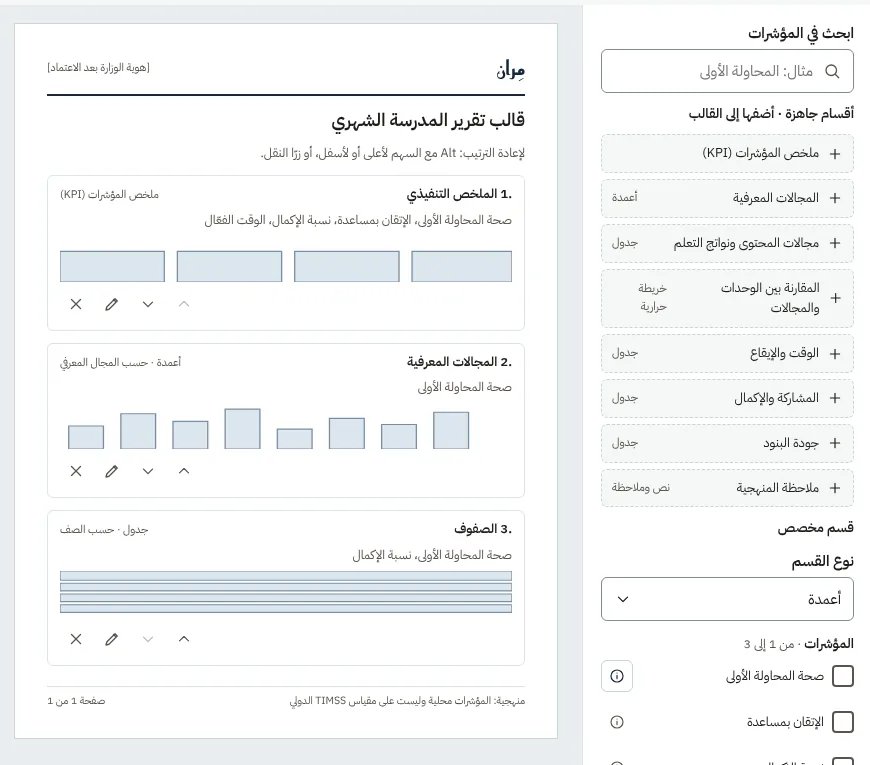
Drill down from country to region, school and class across cognitive domains, content areas, pacing and item quality. Report templates are assembled from governed indicators — each with its definition and formula — and exported with full figures.

Arabic report template builder with an indicator catalogue

06 · AI architecture

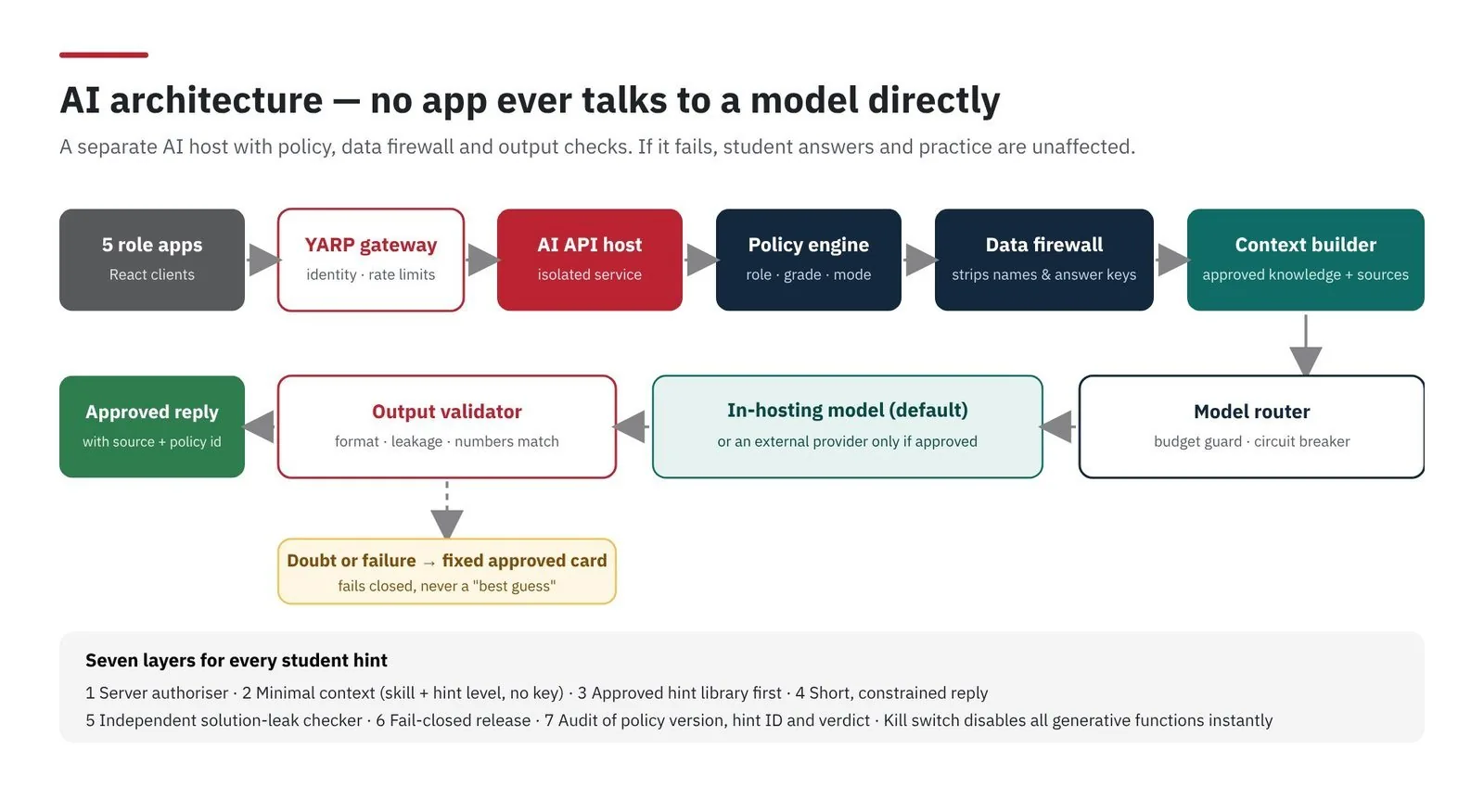
No app ever talks to a model directly

A separate AI host with a policy engine, a data firewall that strips names and answer keys, and an output validator. If anything is in doubt it fails closed to an approved card — and if the AI is switched off, practice and scoring carry on untouched.

AI architecture: gateway, AI host, policy engine, data firewall, context builder, model router, output validator

07 · Engineered to grow

From one school to a whole country

Stateless scale-outAdd API replicas behind the gateway as usage grows — no sticky sessions.
Append-only answersEvery attempt is saved once and safely replayable; nothing is overwritten.
Offline queueAnswers wait on the device and sync when the connection returns.
AI isolatedIf the AI layer stops, practice and scoring carry on untouched.

08 · Ownership

Our own engines, not rented ones

The question runtime, scoring engine, authoring studio, offline sync and analytics are written by our team — no dependence on third-party assessment services. Items and rubrics are immutable and versioned, so every published question can be traced and reproduced.

Questions people ask

Does Miran work without internet?

Yes. The student app keeps working offline and syncs answers when the connection returns, without losing or duplicating attempts.

Which question types are supported?

More than 25 interaction types, including drag-and-drop, drawing, tables, number lines and virtual labs, with on-screen tools.

How is AI used?

Only as an optional guide that drafts hints and insights through a policy layer. It never scores, approves or publishes, and the platform works fully without it.

Next story

Environmental Monitoring & GIS Platform
Talk to the team

Have a system to build?

Tell us the problem. An engineer — not a salesperson — replies within one working day.